Many small businesses assume automation requires a developer, a large budget and a complex IT project.
That is no longer necessarily true.
Modern automation platforms allow businesses to connect forms, emails, spreadsheets, CRMs and other services without building everything from scratch.
The OECD's 2026 survey of SMEs also highlights that off-the-shelf AI applications are increasingly common, although strategic and secure integration remains uneven.
The opportunity is therefore not simply to buy AI software.
It is to identify repetitive workflows and connect the right tools.
Start by finding repetitive tasks
Look at what employees do every day.
For example:
Copying customer information
Sending confirmation emails
Creating invoices
Updating spreadsheets
Following up with prospects
Moving information between systems
Generating reports
Answering repetitive questions
These are potential automation candidates.
Example 1: Automate customer inquiries
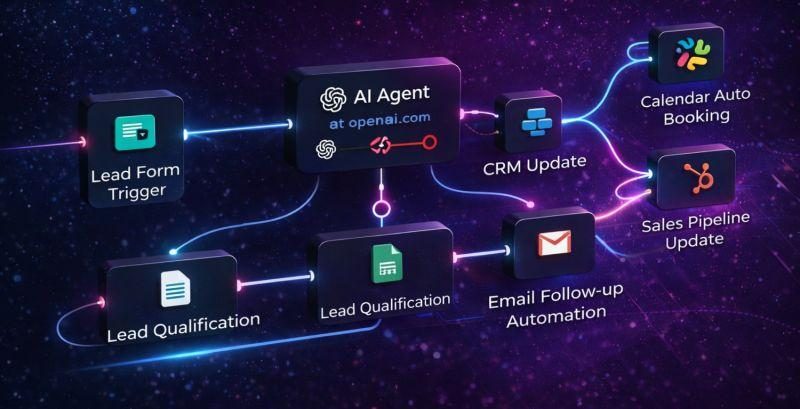
Imagine a customer fills out a website form.
Without automation:
Form → employee receives email → employee reads it → employee copies information → employee replies → employee creates task
With automation:
Form → CRM → AI classification → suggested response → sales task
The employee still has control, but much of the administrative work disappears.
Example 2: Automate invoices
A simple workflow could be:
Order received
↓
Customer information collected
↓
Invoice generated
↓
Invoice emailed
↓
Payment status recorded
This doesn't require building an entire accounting platform.
It can often be achieved by connecting existing services.
Example 3: Automate social-media content
A business could create a weekly workflow:
Product/service information
↓
AI generates content ideas
↓
Human reviews
↓
Images created
↓
Posts scheduled
The human remains responsible for the message and brand.
AI simply reduces the repetitive work.
Example 4: Automate weekly reports
Suppose a company tracks:
Revenue
Expenses
Leads
Orders
Website traffic
Instead of manually preparing a report every Monday, an automated system can collect the data and prepare a summary.
The manager can then focus on interpreting the results rather than assembling the spreadsheet.
A simple automation framework
Before automating anything, ask five questions:
1. Is the task repetitive?
If you only perform it once a month, automation may not be worthwhile.
2. Does it follow predictable rules?
Automation works best when the workflow has clearly defined steps.
3. Does it involve large amounts of data?
If employees repeatedly copy information between systems, automation can create significant value.
4. Does it require human judgment?
If yes, don't necessarily automate the entire process.
Automate the preparation and leave the final decision to a person.
5. What happens if the automation fails?
Every important workflow should have a fallback.
Don't automate a broken process

This is one of the most important rules.
If your current process is:
Customer → WhatsApp → employee → spreadsheet → notebook → email
don't immediately build a complicated automation around it.
First simplify the process.
For example:
Customer → form → CRM → notification
Then automate it.
Where AI fits into automation
Traditional automation follows rules:
If X happens → do Y.
AI can add interpretation.
For example:
If a customer sends a message, determine whether it is a complaint, quotation request, technical question or sales inquiry.
The automation can then send the request to the appropriate workflow.
This is where AI becomes particularly useful.
A practical starting plan
Week 1
Identify the five most repetitive tasks in the company.
Week 2
Choose one task.
Week 3
Automate it.
Week 4
Measure:
Time saved
Errors reduced
Employee adoption
Customer response time
If the result is positive, automate the next workflow.
Final thoughts
You don't need to transform your entire business overnight.
One automated workflow can be enough to demonstrate the value of digital transformation.
The goal isn't:
"We use AI."
The goal is:
"We spend less time doing repetitive work and more time serving customers."